
Introduction
Cervical decompression-whether through anterior cervical discectomy and fusion, chiropractic traction, or non surgical curve correction-can deliver meaningful improvement in neck pain, arm pain, and neurological symptoms. But the gains you achieve in the clinic are only as durable as the ergonomics you practise at your workstation afterward. For singapore office workers returning to prolonged sitting in front of screens, understanding ergonomics post treatment is the single most important factor in maintaining your cervical decompression results at Singapore workstations.
This article is written for hybrid and office workers in Singapore who have completed cervical decompression surgery, spinal decompression traction, or a chiropractic correction program and now need to protect their cervical spine during 8–10-hour workdays. Return-to-work timing may differ for people in physically demanding occupations compared with desk-based roles. It does not cover acute emergencies or red-flag neurological conditions requiring immediate medical attention. Instead, it focuses on what you can control every day: monitor height, phone positioning, neck curve preservation, and daily posture habits with pictures to track your progress.
The short answer: a properly optimized workstation supports cervical decompression treatment outcomes by keeping your head balanced over your shoulders, your screens at eye level, and your lumbar spine supported-so the restored natural curve of your cervical spine isn’t slowly reversed by forward head posture. Pair that setup with posture photo self-checks and simple rehabilitation exercises, and you give your neck the best chance of staying well.
Here is what you will gain from this article:
-
How to set up a neck-safe workstation in Singapore, including common office furniture, hot-desking, and small HDB/condo realities.
-
How to preserve cervical lordosis through precise screen, laptop, and phone positioning.
-
How to use simple daily photos and selfies to monitor posture changes over weeks and months.
-
What warning signs indicate you are undoing your decompression results and should seek medical advice.
-
How Everton Chiropractic can support your maintenance and review your progress.
Understanding Cervical Decompression and Why Ergonomics Matters
Cervical decompression refers to any procedure performed to relieve pressure on the spinal cord, nerve roots, or spinal discs in the neck. This includes surgical options such as anterior cervical discectomy and fusion (ACDF) or posterior cervical laminectomy, as well as non surgical approaches like cervical extension traction, chiropractic adjustments, and curve-correction protocols. The shared goal is to widen the spinal canal, reduce nerve root compression, and restore proper alignment so that pain, tingling, and weakness improve. But decompression opens a window of opportunity-it does not guarantee permanent results. How you load your cervical spine during work hours determines whether that window stays open.
What Happens to Your Neck Before Decompression
Most patients who need cervical decompression have spent years accumulating damage. In Singapore’s screen-heavy work culture, that damage often begins with a flattened or reversed neck curve. Office workers sit for extended periods with monitors too low, laptops flat on desks, and phones held in their laps-all of which push the head forward. Neck pain often results from poor screen placement and forward head posture, and over time, this sustained flexion accelerates degenerative disc disease, disc herniation, and nerve irritation.
A survey of 324 Singapore office workers found that 73.4% reported musculoskeletal pain somewhere in their body, with neck pain affecting 46% of respondents. Women showed even higher prevalence. At Everton Chiropractic, patients commonly report a cluster of symptoms, including recurring tingling, numbness, or other nerve symptoms, before beginning care:
-
Persistent neck pain and stiffness worsening toward the end of the workday
-
Radiating arm pain or tingling into the hands (cervical radiculopathy)
-
Headaches originating from the base of the skull
-
Tight shoulders and mid-back fatigue from compensatory muscle tension
These symptoms reflect structural changes: loss of cervical lordosis, increased disc stress, facet joint overload, and in some cases, spinal cord compression or cervical myelopathy. When conservative treatment fails-or when a herniated disc or bone spur significantly narrows the spinal canal or the openings where nerves exit-a spine surgeon may recommend cervical decompression surgery. In many patients, however, non surgical management through traction and chiropractic correction can restore alignment before surgery becomes necessary.
What Cervical Decompression and Curve Correction Actually Improve
Cervical decompression and curve correction aim to create measurable, structural change. Cervical extension traction restores 12 to 18 degrees of lordosis, and research shows that patients who restored their neck curve improved for up to 2 years. Importantly, regular traction alone does not restore the neck’s natural curve-it must be combined with the right type of extension-based protocols and follow-up care.
In one study of ACDF patients, those whose cervical lordosis was restored postoperatively reported significantly greater improvements in Neck Disability Index scores and neck pain compared with patients who remained kyphotic. These postoperative imaging findings also support surgical planning and follow-up decisions, and can influence surgical planning by showing alignment and structural constraints. An eighteen-month cohort following posterior decompression fusion confirmed that patients maintaining C2–C7 sagittal vertical axis under 40 mm and thoracic slope minus cervical lordosis mismatch under 15° achieved better outcomes in both pain and disability.
At Everton Chiropractic, the focus is on structural correction and posture retraining-not only temporary pain relief. Patients can expect reduced nerve pain, improved range of motion, fewer headaches, and better spinal alignment. But decompression does not create an invincible neck. The tissues-discs, ligaments, facet joints-are now in a more optimal position, but they remain vulnerable to the same forces that damaged them in the first place.
Why Post-Treatment Ergonomics Is Non‑Negotiable
Going back to the same workstation setup that contributed to your cervical disc problems is like repairing a foundation and then placing the same unbalanced load on top of it. Sitting in a forward-leaning position increases disc pressure, and prolonged static sitting causes gradual spinal compression. At neutral head position, your head weighs roughly 4.5–5 kg on the cervical spine. But with approximately 60° of forward tilt-common when texting or using a phone in your lap-loading can reach approximately 27 kg. That is more than five times the neutral load, applied hour after hour, day after day.
Prolonged sitting can lead to herniated discs in the lumbar spine, and the same mechanism affects the cervical spine. The cumulative effect of 8–10 hours per day of forward head posture on spinal discs and the posterior longitudinal ligament can slowly reverse decompression results within months. Post-treatment ergonomics is part of your treatment plan-not an optional extra. The next section walks through exactly how to set up your workstation to protect those hard-won structural gains.
Designing a Cervical-Friendly Workstation in Singapore
The structural improvements from cervical decompression change how loads are distributed through your cervical spine. Your job is to make sure your workstation setup keeps those loads in the safe zone. This section provides practical adjustments for typical Singapore environments: corporate offices in the CBD, home offices in HDB flats and condos, and hot-desking or co-working spaces.
Monitor Height and Screen Arrangement
Monitor positioning is the single most impactful workstation variable for your cervical spine. Adjust monitor height to keep the top of the screen at or slightly below eye level. The centre of the screen should sit somewhat lower, creating a gentle downward gaze angle of approximately 10–20°-enough to keep the neck in a neutral position without forcing flexion or extension.
Place your computer monitor about an arm’s length away (roughly 50–70 cm) to prevent leaning forward. OSHA’s workstation guidelines confirm that this distance allows visual clarity without encouraging forward head posture.
For common Singapore setups:
-
Single external monitor with laptop closed or off to the side: Position the external monitor directly in front of you. If the laptop remains open as a secondary screen, place it to one side at a similar height to minimise lateral neck rotation.
-
Dual monitors for traders or analysts: Place your primary screen directly ahead and position the secondary screen immediately beside it with minimal gap. Avoid constantly swivelling your head by keeping frequently used windows on the primary monitor.
-
Standing desk users: Ensure the monitor height adjusts for both sitting and standing positions. Many patients invest in a standing desk after spine surgery, and it can be beneficial-but the monitor must follow your eye level in both positions.
You can recognise a too-low monitor by watching for chin poking forward and a too-high monitor by noticing neck extension or an upward head tilt. Affordable solutions include monitor risers, stacked books, or adjustable monitor arms available from local retailers.
Laptop and Phone Positioning to Protect the Neck Curve
Working long hours on an unraised laptop is particularly those harmful habits that undo decompression results most quickly. An unraised laptop screen forces approximately 30–40° of sustained cervical flexion-well beyond what the recovering cervical spine should tolerate. Using an external keyboard and mouse reduces awkward neck positions while working on a laptop, and a laptop stand raises the screen to the correct height while also reducing wrist strain linked to carpal tunnel syndrome.
Follow these positioning rules to protect your restored cervical lordosis:
-
Use a laptop stand (or a stack of sturdy books) so the top of the screen reaches eye level, and pair it with an external keyboard and mouse placed at elbow height.
-
For Teams or Zoom calls, raise the laptop or phone to eye height using a stand instead of looking down at the screen in your lap.
-
When scrolling on your phone, hold the device at chest or eye level rather than in your lap. Rest your elbows on armrests or the desk surface to reduce arm fatigue.
-
Limit phone use for long reading sessions-prefer a monitor or tablet at eye level for lengthy documents, emails, or reports.
Keeping screens at eye level directly supports the natural curve of your cervical spine by preventing the sustained flexion that re-compresses spinal discs and loads nerve roots. Cervical disc protrusions can cause neck pain and headaches, and habitual phone scrolling at low angles is one of the fastest ways to bring those symptoms back. If you experience recurring neck pain and headaches, your phone habits are worth examining closely.
Chair, Desk Height, and Neck-Supporting Posture
Neck posture is influenced by the entire sitting position and spinal support-not just head position. Proper seating posture keeps feet flat on the floor and supports spinal curves from the pelvis upward. The ideal sitting arrangement:
-
Feet flat on the floor, with hips slightly higher than knees. Using a footrest can improve spinal alignment while sitting if your desk is too high for flat feet.
-
Elbows at approximately 90°, with shoulders relaxed-not hiked up toward the ears. Keep keyboard and mouse at a height that allows this naturally.
-
Back fully supported, with adequate lumbar support maintaining the natural inward curve of the lumbar spine and slight thoracic extension allowing the cervical curve to sit naturally on top.
Using an adjustable chair with lumbar support prevents slumping and forward head posture. Sitting in a slumped position increases disc pressure significantly, and research shows that lumbar and thoracic support improves the craniovertebral angle (a clinical measure of forward head posture) while decreasing upper trapezius muscle stiffness. Proper lumbar support maintains the natural inward curve of the spine, which in turn supports proper alignment of the cervical spine above it. Breathable mesh chairs suit humid environments like Singapore by providing support and airflow-a practical consideration for year-round comfort.
Slouching or perching at the edge of the chair encourages chin-forward posture that re-compresses the neck. From the side, good neck posture should look like this:
-
Ear stacked directly over the shoulder joint, not in front of it
-
Gentle inward curve visible at the neck (cervical lordosis preserved)
-
Shoulders drawn slightly back and down, not rounded forward
-
Chin level-neither tucked too far down nor lifted up
If you are working from a basic dining chair at home, use cushions for seat height, a separate lumbar roll for lower-back support, and ensure you are not sitting on the front edge. For a deeper guide to correcting sitting and standing posture, review the practical strategies outlined on our posture resources page.
Singapore-Specific Constraints: Hot-Desking, Small Spaces, and Hybrid Work
Singapore’s work environment presents unique challenges for post-treatment ergonomic compliance. Hot-desking in CBD towers means fixed furniture heights, shared monitors, and limited adjustability. Small HDB flats and condos may force workers to use dining tables and chairs lacking armrests or lumbar support. Hybrid work means you need a functional setup in two or more locations.
Portable solutions that fit in a work bag:
-
A lightweight, foldable laptop stand and compact external keyboard and mouse-these address the two most critical variables (screen height and arm position) at any desk.
-
A clip-on phone holder or small tripod for eye-level video calls, so you are not craning your neck downward during meetings.
-
A portable lumbar roll for non-ergonomic chairs, maintaining the spinal support chain from pelvis to neck.
If you can only change one or two things at a non-ideal desk, prioritise monitor or phone height and sitting posture. These two adjustments create the largest reduction in unnecessary strain on the cervical spine. The goal is to make the ergonomic choice the default setting, even in imperfect environments.
Daily Habits to Preserve Your Cervical Curve After Treatment
Proper desk ergonomics can reduce musculoskeletal disorders, but even a perfectly arranged workstation cannot compensate for hours of motionless sitting. Good equipment must be paired with smart daily habits to truly maintain the gains from cervical decompression or curve correction. Sitting increases intradiscal pressure significantly compared to standing, and without regular interruptions, even “good” posture gradually degrades as muscles fatigue and ligaments creep under sustained load.
Posture “Micro-Checks” Throughout the Day
A posture micro-check takes 10–20 seconds and should happen every 30–60 minutes. Micro-breaks of standing or gentle movements every 30 to 60 minutes are recommended by Singapore physiotherapists and international ergonomic guidelines alike. Here is a simple micro-check sequence you can memorise:
-
Check ear position: Is my ear directly over my shoulder, or has my head drifted forward?
-
Chin retraction: Gently draw the chin straight back (as though making a “double chin”) without tilting the head up or down. This subtle rehabilitation exercise can reactivate deep cervical stabilizers affected by static sitting.
-
Shoulder reset: Roll shoulders back and down, opening the chest.
-
Breathe: Relax the jaw, unclench the teeth, and take 3–4 slow belly breaths.
Practical prompts that work: set a recurring phone reminder every 45 minutes, use calendar alerts between meetings, or pair posture checks with habitual events-every time you send an email, answer a call, or return from the pantry. Consistency matters more than perfection.
Movement Breaks That Decompress the Neck Naturally
Long static sitting loads the spinal discs and ligaments even when posture looks correct. Regular movement breaks can prevent discomfort during long sitting hours and reduce sustained neck loading during work. Regular movement breaks can also reduce the risk of neck and back pain and help prevent sciatica symptoms in the lumbar spine.
A sample hourly routine:
-
Every 30–45 minutes: Stand and walk for 1–2 minutes-down the corridor, to the pantry, or simply around your desk area.
-
Perform 2–3 simple exercises: Chin tucks help realign cervical vertebrae during prolonged sitting. Scapular squeezes activate mid-back stabilizers and relieve neck tension. A gentle thoracic extension over the chair back opens the chest and counteracts the rounding that pulls the neck forward. These are the same exercises commonly prescribed during care at Everton Chiropractic.
-
For hybrid workers: Combine mini walks with practical tasks-refilling water, collecting printouts, or changing rooms for the next call.
Individuals should avoid additional aggressive neck stretches or traction devices unless recommended by clinicians. Post–cervical decompression surgery patients, particularly those with fusion hardware or disc replacement, must follow their spine surgeon’s specific guidance on what movements are safe and when. If you are unsure about the right exercises for your stage of recovery, learning how to improve spinal mobility safely is a good starting point.
Screen Time Rules for Phones and Secondary Devices
Phone use during the commute and after work hours is where many patients unknowingly accumulate the most cervical flexion stress. During MRT or bus rides, holding a phone in the lap with chin to chest reproduces the exact loading pattern-up to 27 kg of compressive force-that contributed to the original nerve compression or disc herniation.
Clear rules of thumb for phone and secondary device use:
-
Convert long WhatsApp or email threads to desktop replies when possible, so you are reading on a screen at eye level rather than in your hand.
-
During MRT or bus rides, keep the phone at eye level with your back supported against the seat. Even raising the phone 15–20 cm reduces cervical flexion substantially.
-
Use voice notes or phone calls rather than long text bursts when your neck is fatigued.
-
Set app time limits for social media in the evenings-stress and fatigue push people back to old scrolling habits that worsen tech neck.
The goal is to avoid repeated flexion angles over 30–40° for sustained periods. Every minute spent with the chin down and the head forward adds to cumulative disc and ligament stress that can slowly undo the gains from your decompression or correction program.
Using Photos to Monitor Your Neck Posture and Progress
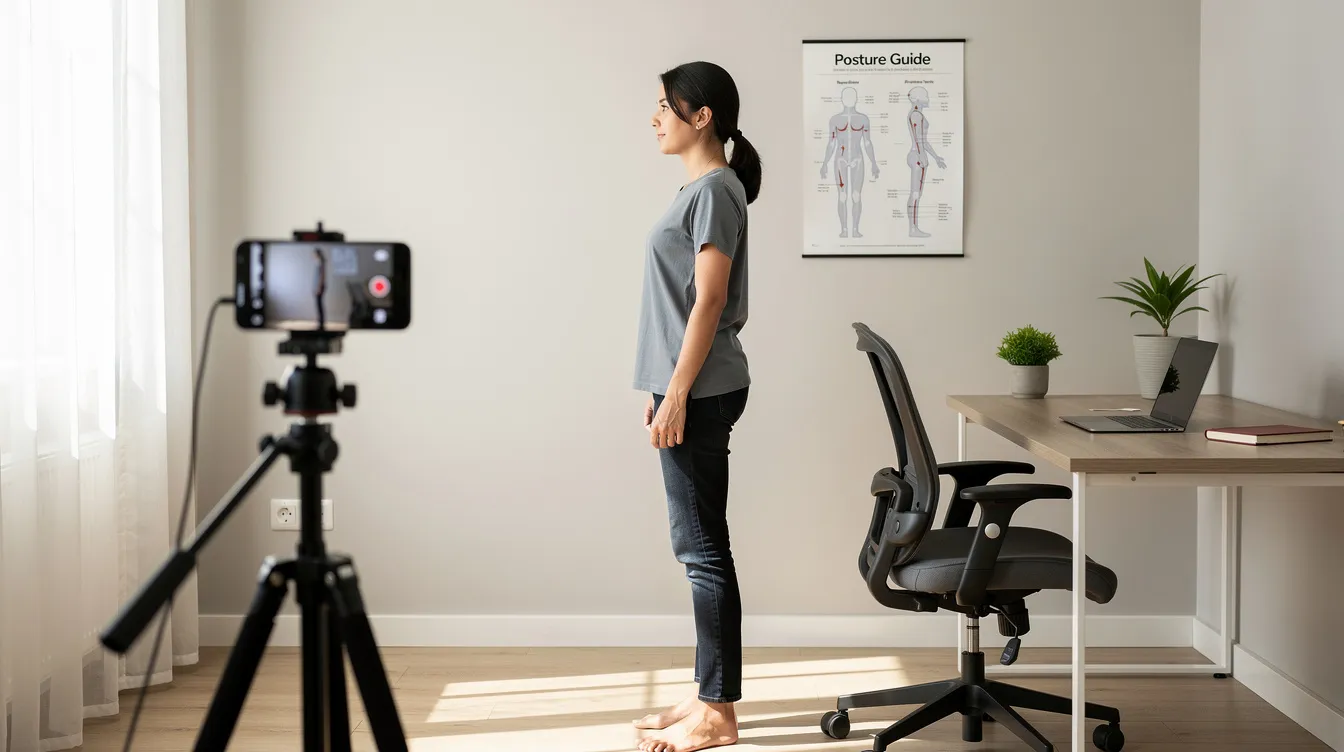
Between clinic visits, you need a practical way to check whether your posture is holding or slipping. Regular posture photos-taken with your phone-offer a simple, privacy-safe method to track neck and upper-back alignment over weeks and months. This is not a replacement for clinical examination or magnetic resonance imaging, but it provides valuable visual data that you and your clinician can review together.
How to Take Reliable Posture Photos (Front, Side, and Back)
Consistency matters more than photographic skill. Use the same location, similar lighting, and the same type of clothing each time so that changes in posture are visible rather than obscured by different angles or outfits.
Step-by-step for a side-view posture photo:
-
Stand in a relaxed, natural posture beside a plain wall-do not try to pose “perfectly.” The goal is to capture your real working posture.
-
Ask a colleague or family member to hold the phone at your shoulder height, about 2–3 metres away.
-
Ensure the frame includes your entire body from head to at least the hips, so the ear–shoulder–hip relationship is clearly visible.
-
Take 2–3 shots and choose the clearest one.
For solo photos, use a phone tripod or lean the phone against a box on a shelf at shoulder height, and use the 10-second timer mode. Repeat from the front and the back for a complete set.
What to Look For in Your Photos
You do not need professional software to read your posture photos. Focus on these visual checkpoints:
-
From the side: Is the centre of the ear directly above the shoulder joint? If the ear sits forward of the shoulder, forward head posture is present. The further forward, the greater the load on your cervical spine.
-
From the front: Is the head tilted to one side? Are the shoulders level, or is one noticeably higher?
-
From the back: Is one shoulder blade more prominent than the other? Does the neck appear to lean off midline?
Over time, successful maintenance looks like this: the head sitting more directly over the shoulders, less rounding visible between the shoulder blades, and the neck appearing longer rather than compressed. Fine details of the cervical lordosis itself-measured as the C2–C7 Cobb angle-are best assessed with clinical imaging or X-ray at your chiropractor’s office, not from external photos alone.
Monthly Photo Check-Ins and Sharing With Your Clinician
Take your first set of photos at the end of your decompression or curve-correction program, then monthly for the first 6–12 months after returning to full work duties. Keep a private album on your phone labelled by month and year so you can compare images side by side and observe trends.
At Everton Chiropractic, clinicians may review these photos during maintenance visits to fine-tune exercises and workstation advice. Comparing monthly posture photos with physical examination findings and symptom trends gives a much clearer picture of whether your spinal alignment is holding. Share images only if you are comfortable doing so, and use whatever secure channel the clinic recommends.
Advanced Implementation: A One-Week Neck-Safe Workstation Reset Plan
Turning principles into action is easier with a structured plan. Use this one-week reset when returning from medical leave, finishing an Everton Chiropractic correction phase, or after a symptom flare-up that signals your setup needs attention.
Step-by-Step Reset Plan
-
Day 1–2: Adjust heights and capture your baseline. Set monitor height so the top of the screen is at or slightly below eye level. Raise your laptop on a stand with an external keyboard and mouse. Take baseline posture photos-side, front, and back-at work and at home.
-
Day 3–4: Install habit triggers. Set phone reminders or calendar alerts for posture micro-checks every 45 minutes and movement breaks every 30–60 minutes. Practise chin tucks (5 repetitions, holding 5 seconds each) and shoulder resets during each break.
-
Day 5–6: Refine sitting posture and chair setup. Add a lumbar roll if your chair lacks adequate lumbar support. Adjust seat height so feet are flat and hips sit slightly higher than knees. Confirm that keyboard and mouse placement allows relaxed shoulders and elbows near 90°.
-
Day 7: Review and plan. Compare your Day 7 posture photos with your Day 1 baseline. Note any changes in symptoms-pain rating, stiffness, headache frequency-in a brief journal. List questions to bring to your next Everton Chiropractic review visit.
Repeat or extend the plan over 2–3 weeks until the new habits feel automatic. Many patients find that by Week 3, posture checks and movement breaks become integrated into their workflow rather than feeling like interruptions.
Comparing “Old” vs “New” Workstation Habits
Small, consistent changes in angles and habits create large differences in long-term cervical loading. Here is how the contrast typically looks:
-
Old: Laptop flat on desk, head bent 30–40° forward. New: Laptop on stand with external keyboard, neutral neck with gaze angled gently downward 10–20°.
-
Old: Scrolling phone in lap during lunch break, chin to chest. New: Short walk during lunch, phone held at chest level if needed.
-
Old: Working 3–4 hours nonstop with no position change. New: 45–60 minute focused blocks followed by 2-minute movement breaks.
-
Old: Slouching in a dining chair with no back support. New: Seated with lumbar roll, feet flat, pelvis neutral, thoracic spine gently extended.
Ergonomic adjustments can enhance productivity and reduce absenteeism-so these changes benefit your work output as well as your cervical spine. Ergonomic adjustments can also prevent long-term spinal complications, including recurrence of disc herniation and progressive weakness from renewed nerve damage.
Common Post-Treatment Challenges and How to Fix Them
Many patients struggle with relapse triggers during busy Singapore workweeks. The following solutions address the most common issues reported at Everton Chiropractic and in the broader post-decompression population.
Problem 1: Neck Pain Creeps Back by Late Afternoon
The pattern: mornings feel comfortable, but a dull ache, stiffness, or worsening pain builds by 4–6 pm. This typically reflects cumulative forward head drift and muscle fatigue from static sitting over several hours.
-
Check your mid-day posture with a quick side-view selfie. If the ear has drifted in front of the shoulder, you know the problem.
-
Schedule a dedicated 5-minute “neck reset” after lunch: walk for 2 minutes, perform chin tucks and chest-opening stretches, then return to your desk with proper alignment re-established.
-
Reassess monitor height-it may have shifted, especially on a shared desk. Regular movement breaks reduce sustained neck loading during work and prevent the afternoon pain cycle.
Problem 2: Falling Back Into Phone Scrolling and “Tech Neck”
Stress and fatigue push people back to old phone habits. Prolonged phone scrolling in flexion is one of the fastest ways to reproduce nerve irritation and disc stress after treatment.
-
Set app time limits for social media and recreational scrolling in the evenings.
-
Designate a “phone chair” at home where the phone must be held at chest or eye level-not in the lap.
-
Replace some phone screen time with audio options (podcasts, audiobooks, voice messages) so the neck can stay neutral. Sciatica symptoms can be aggravated by poor posture, and the same principle applies to cervical radiculopathy.
Problem 3: Hot-Desk or Shared Office with Fixed Furniture
Fixed monitor arms, non-adjustable chairs, and shared terminals are common in Singapore’s CBD offices and co-working spaces.
-
Keep a personal ergonomic kit in your bag: a portable laptop riser, compact keyboard and mouse, and a lumbar roll. This kit addresses the highest-impact variables regardless of desk type.
-
When possible, choose desks where monitor arms can be adjusted. If that is not an option, use your laptop on a stand as the primary screen.
-
Shorten continuous sessions at highly non-ergonomic desks. Use meeting rooms, breakout spaces, or a standing desk area for posture breaks between focused work blocks.
Problem 4: Unsure If Posture Is Really Improving
Doubt about progress is common, particularly those weeks where pain has resolved but the patient is not sure whether alignment is genuinely better or simply pain-free for now. Recovery varies from person to person, and physical therapy and ergonomic changes produce gradual rather than dramatic visual shifts.
-
Compare monthly posture photos side by side and look for specific changes: ear position relative to shoulder, degree of shoulder rounding, head tilt.
-
Track 2–3 metrics in a notebook or app: daily pain rating, headache frequency, and how long you can sit without stiffness.
-
Bring your photos and notes to Everton Chiropractic review appointments for professional interpretation. Clinical imaging can confirm whether cervical lordosis is being maintained, and your clinician can adjust exercises and workstation advice accordingly.
Conclusion and Next Steps
Cervical decompression or curve correction is the starting point-not the finish line. Ergonomics, phone positioning, and daily posture habits with photos are what keep your cervical results stable in Singapore’s screen-heavy work culture. A properly optimized workstation supports cervical decompression treatment outcomes, and the habits you build around that workstation determine whether meaningful improvement lasts months or years.
Your immediate action steps:
-
Today: Adjust your monitor and phone heights using the guidelines above, and take baseline posture photos (side, front, back).
-
This week: Set up micro-check reminders and schedule movement breaks every 30–60 minutes throughout your workday.
-
This weekend: Review your commute and home phone habits. Identify the moments where your neck spends the most time in flexion and implement one change.
-
This month: Book or confirm a follow-up with Everton Chiropractic to review your workstation photos, reassess spinal alignment, and refine your maintenance plan.
Related topics worth exploring include lumbar sitting posture and back pain prevention, sleeping positions after cervical decompression, and exercise routines for desk workers that complement neck-focused ergonomics. Each of these contributes to the whole-spine stability that protects your cervical spine long-term.
Additional Resources and FAQs
This section answers common quick questions and points to helpful tools for self-management between clinic visits.
Helpful Tools and Checklists
-
A printable “Neck-Safe Workstation” checklist covering monitor height, chair position, keyboard and mouse placement, and phone habits-ask for a copy at your next Everton Chiropractic visit.
-
A one-page guide for taking consistent posture photos at home or in the office, including camera distance, height, and clothing tips.
-
Built-in phone reminder features (iOS Focus modes, Android clock app) or habit-tracking apps to schedule posture micro-checks every 45–60 minutes.
Frequently Asked Questions
How soon after cervical decompression or chiropractic traction can I return to full-time desk work? Recovery varies depending on whether you had a surgical procedure like cervical discectomy and fusion or a non surgical correction program. Many patients return to desk work within 2–6 weeks post-surgery or immediately after completing a traction protocol, but some need a longer recovery period, especially after multilevel procedures or when returning to more physically demanding work rather than sedentary desk duties, and should implement all ergonomic adjustments before resuming full hours. Your spine specialist or chiropractor will confirm readiness based on your specific case.
Is it safe to use a standing desk after neck treatment? Standing desks can be beneficial because they reduce prolonged sitting and allow more natural spinal loading. The key is to ensure your computer monitor adjusts to the correct eye-level height in both positions and that you alternate between sitting and standing rather than locking into either posture for hours.
How much forward head posture is acceptable if my job involves constant screens? Clinically, a craniovertebral angle below 51° is associated with forward head posture and increased neck pain risk. The goal is to keep your ear aligned over your shoulder as consistently as possible. Some brief forward drift is unavoidable, which is why micro-checks and movement breaks every 30–60 minutes are so important.
Do I need special ergonomic equipment, or can I make do with what I have at home? Proper desk ergonomics can reduce musculoskeletal disorders even with basic adjustments. A stack of books under a laptop, a rolled-up towel as a lumbar roll, and a phone timer for movement breaks cost nothing and address the most critical risk factors. Dedicated equipment like adjustable chairs and monitor arms offer convenience but are not strictly required.
When should I contact Everton Chiropractic or a spine specialist about returning symptoms? Seek medical advice promptly if you experience a return of neurological symptoms such as tingling or numbness in the arms or hands, progressive weakness, balance problems, radiating arm pain, or any concerns about bowel control. Gradual increase in persistent back pain or neck pain toward the end of the workday-especially if it does not respond to posture resets and movement breaks-also warrants a professional review. You can book an assessment at Everton Chiropractic for personalised workstation advice with X-ray and posture photo review.