Ergonomics is defined as the science of designing environments and behaviors to fit the human body, and its role in spine health is to reduce mechanical strain on spinal tissues while supporting long-term function. Poor workstation setup, static postures, and sedentary habits are leading contributors to neck and back pain. The good news is that the fix rarely requires expensive equipment. Occupational health research consistently shows that frequent posture changes and targeted movement protect the spine far more than any single piece of furniture. Evertonchiropractic sees this pattern daily: people who move more, sit less rigidly, and build physical strength recover faster and stay well longer.
How does poor ergonomics affect your spine?
Poor ergonomics places the spine under sustained mechanical load in positions it was not built to hold for hours at a time. When you sit slumped at a desk, the lumbar curve flattens, compressing the front of the intervertebral discs and stretching the posterior ligaments. Over time, this uneven loading accelerates disc degeneration and joint stiffness.
The discs between your vertebrae have no direct blood supply. They depend on a pumping mechanism: cyclic compression and decompression during movement drives nutrients in and waste products out. Prolonged static sitting shuts this pump down. The result is disc dehydration and reduced tissue resilience.
Research published in 2026 quantifies exactly how damaging static posture is. Sit-to-stand transitions every 10 minutes increase cartilage IGF-1 uptake by 15.8% over five hours compared to static sitting. IGF-1 is a growth factor that repairs and maintains cartilage. That number means frequent movement is not just comfortable. It is biologically necessary for disc and joint health.
Static loading also affects the smaller facet joints along the spine. These joints rely on synovial fluid circulation, which movement stimulates. Sitting without breaks for 90 minutes or more reduces this circulation, contributing to the stiffness and aching most desk workers recognize by mid-afternoon.
- Disc compression: Sustained forward flexion increases intradiscal pressure and starves disc tissue of nutrients.
- Ligament creep: Holding one posture for extended periods stretches spinal ligaments beyond their elastic range, reducing their protective function.
- Muscle fatigue: Static muscle activation to hold posture leads to localized fatigue and trigger points in the neck, upper back, and lumbar region.
- Joint stiffness: Reduced synovial fluid movement in facet joints causes the familiar “locked up” feeling after long sitting sessions.
What ergonomic practices actually support spine health?
The goal of ergonomic workspace design is not to achieve one perfect posture. It is to reduce peak load on any single spinal structure by distributing stress across positions and time. That distinction matters because most people set up an ergonomic workstation once and then sit in it rigidly for eight hours, which defeats the purpose.
Chair, desk, and monitor setup
Your chair should support the natural lumbar curve without forcing it. Seat height works correctly when your feet rest flat on the floor and your knees sit at roughly 90 degrees. The monitor top should align with eye level so your neck stays neutral rather than flexed forward. Keyboard and mouse placement should keep your elbows at or just below desk height, reducing shoulder elevation and upper trapezius strain.
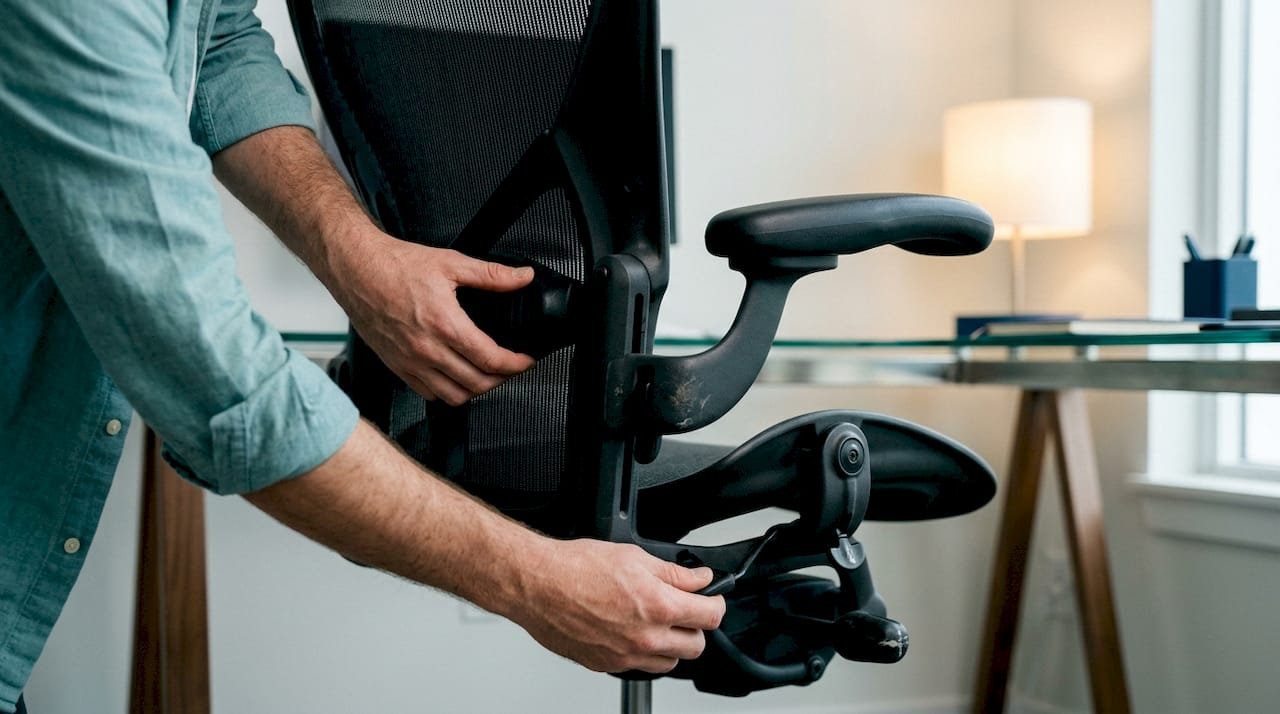
Lumbar support matters, but adjustability matters more. A chair that lets you shift the lumbar pad, seat depth, and armrest height gives you the ability to change your supported position throughout the day. That variety is the actual benefit.
Movement frequency as the key intervention
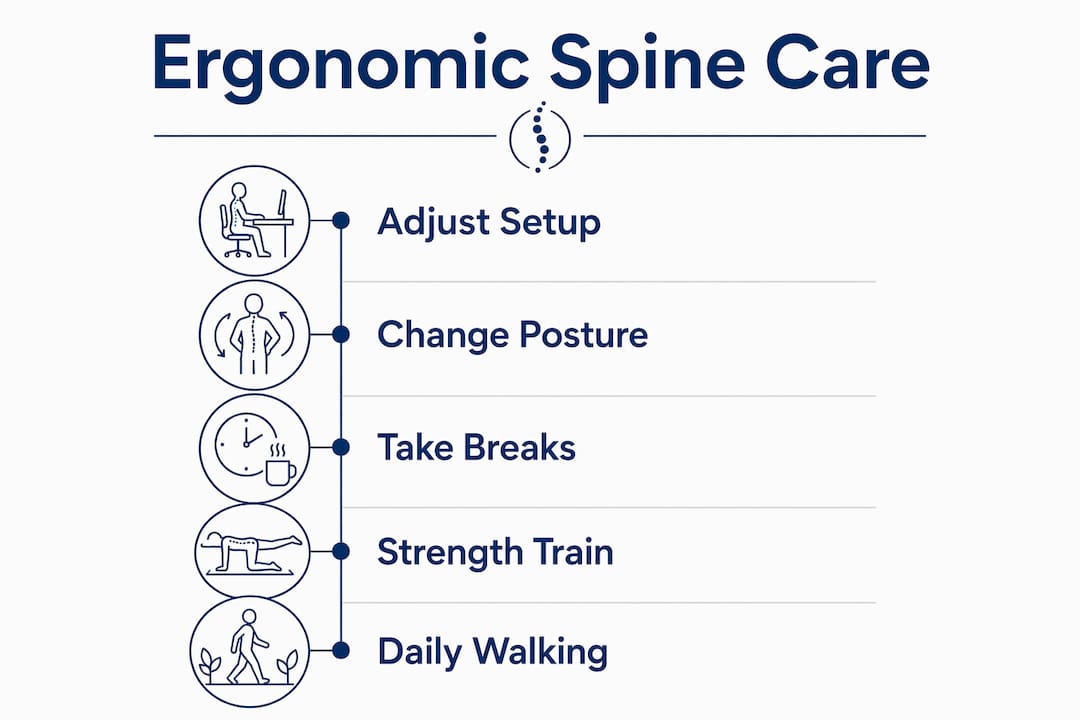
Breaking static posture every 30–45 minutes is more effective for spine health than maintaining any single “correct” position. Even one minute of standing, walking, or gentle movement restores disc fluid exchange and resets muscle activation patterns. Set a timer if you need to. The cue matters less than the consistency.
Sit-stand desks are useful tools, but their value is entirely in enabling position changes. Standing desks alone produce only small, low-certainty reductions in musculoskeletal pain. Standing statically for hours creates its own load problems. The desk is only as good as the habit of alternating between positions.
Pro Tip: Set a recurring 30-minute phone alarm labeled “move” during your workday. Stand, walk to refill water, or do five slow neck rolls. That single habit does more for your spine than a $1,500 ergonomic chair used without breaks.
- Position your monitor an arm’s length away, with the top of the screen at or just below eye level.
- Keep your lumbar curve supported but not forced. A small rolled towel works if your chair lacks adjustable lumbar support.
- Place your keyboard so your elbows stay close to your body and your wrists remain neutral.
- Use a headset or speakerphone for calls longer than five minutes to avoid neck side-bending.
- Alternate sitting and standing every 30–60 minutes rather than committing to either position for long blocks.
Common myths about ergonomics and back pain
The biggest misconception in ergonomics is that there is one ideal posture that protects the spine. There is not. Ergonomics fits environments to human bodies but assumes a neutral, healthy starting posture. It does not account for individual structural differences, previous injuries, or existing spinal conditions. Treating ergonomic guidelines as universal rules leads people to hold one “correct” position rigidly, which creates its own problems.
A second myth is that ergonomic equipment fixes structural spinal problems. Ergonomic chairs and devices manage external load on the spine. They do not treat disc herniation, vertebral misalignment, or chronic pain rooted in spinal degeneration. Buying a better chair when you have a structural issue is like buying better running shoes when you have a stress fracture. It helps at the margins but does not address the source.
A third myth is that standing desks are a cure for desk-related back pain. Research is clear on this point:
- Standing statically for long periods creates its own compressive load on lumbar discs and lower limb joints.
- The benefit of a sit-stand desk comes entirely from the transition between positions, not from standing itself.
- People who stand all day without movement breaks report similar discomfort levels to those who sit all day.
- The correct use of a sit-stand desk is to change position every 30–60 minutes, not to replace sitting with standing.
“The critical metric is not the static posture but the frequency and duration of postural changes. Movement breaks stimulate disc nutrition and prevent stiffness far more reliably than any fixed ‘correct’ position.”
Remote workers face higher spine risk because home environments lack the movement cues that office settings provide. If you have had persistent neck or back symptoms for more than a year, a professional structural spinal assessment should come before investing further in ergonomic equipment. Equipment optimizes a functional spine. It does not rehabilitate a compromised one.
How to build lasting spinal health through movement and lifestyle
Ergonomic adjustments create the conditions for a healthy spine. Movement and physical conditioning are what actually build one. The most effective combination for reducing neck and back pain includes posture changes every 30–60 minutes, 7,000–10,000 daily steps, and strength training 2–3 times per week. No single intervention comes close to matching that combination.
Walking is the most underrated spinal health tool available. It loads the spine in a rhythmic, varied pattern that stimulates disc nutrition, activates postural muscles, and breaks the static loading cycle. Reaching 7,000–10,000 steps daily does not require dedicated exercise time. Walking during phone calls, taking stairs, and parking farther away adds up quickly.
Strength training 2–3 times per week builds the muscular support system the spine depends on. The erector spinae, multifidus, and deep abdominal muscles act as an active brace for the vertebral column. When these muscles are weak, the spine relies more heavily on passive structures like ligaments and discs, which fatigue and degrade faster. Physical activity independently reduces spinal pain regardless of posture, which means strength training delivers benefits even when your workstation is imperfect.
| Habit | Frequency | Spine benefit |
|---|---|---|
| Posture changes | Every 30–60 minutes | Restores disc fluid exchange and reduces static load |
| Walking | 7,000–10,000 steps daily | Rhythmic spinal loading and postural muscle activation |
| Strength training | 2–3 times per week | Builds active muscular support for the vertebral column |
| Variety in postures | Throughout the day | Distributes load across tissues and prevents fatigue |
| Professional assessment | When symptoms persist over 1 year | Identifies structural issues that ergonomics cannot address |
Conservative care including physical therapy and core strengthening resolves the majority of common spine issues over 3–6 months. Surgery is reserved for rapid neurological deterioration or severe disability. That means most people reading this have a meaningful window to improve their spinal health through behavioral and ergonomic changes before any structural intervention becomes necessary.
Pro Tip: If you work from home, build a “movement anchor” into your existing routine. Walk for five minutes before your first video call, stand during your second, and sit for your third. Rotating through positions automatically removes the need for willpower.
You can also build a spinal health routine that combines these habits into a sustainable daily structure. The goal is not perfection. It is consistent variety.
Key Takeaways
Ergonomics supports spine health most effectively when combined with frequent movement, daily walking, and regular strength training rather than relying on equipment alone.
| Point | Details |
|---|---|
| Movement beats perfect posture | Breaking static posture every 30–45 minutes protects discs more than holding any single “correct” position. |
| Disc health requires motion | Intervertebral discs depend on cyclic compression and decompression to exchange nutrients; static sitting shuts this process down. |
| Equipment has limits | Ergonomic chairs and sit-stand desks manage load but cannot treat structural spinal conditions or chronic pain. |
| Strength training is non-negotiable | Building the erector spinae and deep abdominal muscles reduces reliance on passive spinal structures and lowers pain risk. |
| Professional care fills the gap | Symptoms persisting beyond one year warrant a structural spinal assessment before further ergonomic investment. |
What I’ve learned after watching people chase the perfect setup
Most people who come to Evertonchiropractic with desk-related back pain have already bought the expensive chair. Some have the sit-stand desk. A few have the ergonomic keyboard, the monitor arm, and the lumbar cushion. And they still hurt. That pattern taught me something early: ergonomics is a load management tool, not a treatment.
The people who get better are the ones who move more. Not dramatically. Not with a gym membership they will abandon in six weeks. Just more than they were. A walk at lunch. Standing during a call. Getting up every 30 minutes. Those small, boring habits outperform every piece of equipment I have seen.
The other thing I have noticed is that people underestimate how much strength matters. A well-supported spine is an active system. The muscles around it need to be trained, not just rested in a better chair. When patients add even two short strength sessions per week, their tolerance for sitting improves noticeably within a month.
Ergonomics is worth doing. Set up your workstation well. Use a sit-stand desk if you have one. But do not stop there and expect the problem to solve itself. The spine rewards movement, load variety, and physical conditioning. It does not reward the right chair used the wrong way.
— Aman
Spinal care at Evertonchiropractic: beyond the workstation
Ergonomic adjustments are a strong starting point, but they only address what happens at your desk. If you are dealing with persistent back pain, sciatica, or postural problems that have not responded to workspace changes, the issue likely has a structural component that needs direct attention.
Evertonchiropractic, led by Dr. Richard, takes an evidence-informed approach to spinal pain relief that goes beyond surface-level fixes. The clinic offers spinal adjustments, mobility work, and personalized care plans built around your lifestyle and goals. For those with lower back pain that has persisted despite ergonomic changes, a structural assessment with Dr. Richard is the logical next step. You can also explore workday spinal care resources to complement your in-clinic treatment.
FAQ
What is the role of ergonomics in spine health?
Ergonomics reduces mechanical strain on spinal tissues by fitting the work environment to the body’s natural posture and movement needs. Its primary benefit is reducing sustained static load on discs, joints, and muscles during daily activities.
How often should I change posture to protect my spine?
Breaking static posture every 30–45 minutes is more effective for spine health than holding any single correct position. Even one minute of movement restores disc fluid exchange and resets muscle activation.
Can a standing desk fix back pain?
Standing desks alone produce only small reductions in musculoskeletal pain. Their value comes from enabling position changes, not from standing itself. Alternating between sitting and standing every 30–60 minutes is what delivers the benefit.
Does strength training help with spinal health?
Strength training 2–3 times per week builds the muscular support system the spine depends on, reducing reliance on passive structures like ligaments and discs. Physical activity independently reduces spinal pain regardless of workstation setup.
When should I see a professional about spine pain?
Symptoms persisting for more than one year warrant a structural spinal assessment before investing further in ergonomic equipment. Conservative care including chiropractic treatment and core strengthening resolves most common spine issues within 3–6 months.
Recommended
- Workday Spinal Care Best Practices for Office Workers – Everton Chiropractic
- Lifestyle’s Role in Spinal Wellness: 2026 Guide – Everton Chiropractic
- Why Spinal Health Matters Long Term for Your Wellness – Everton Chiropractic
- The Role of Vertebral Alignment in Health and Wellness – Everton Chiropractic